Types that follow the specification

Swagger 2.0, OpenAPI 3.0 to 3.2 and JSON Schema in, TypeScript or Rust out. Every value a schema accepts, its type accepts, checked on the official JSON Schema Test Suite.

npx @localix-ai/flowapi openapi.json -o types.ts

A Rust generator, also on npm · MIT · no runtime dependency · Get started

What flowapi gives you

Each figure from its own runs

Output

Types you would have written

One type for each component schema and each operation, and Paths for the whole API. A schema’s description sits above its member, and the keywords TypeScript cannot state (pattern, minimum) are named in a comment over the type.
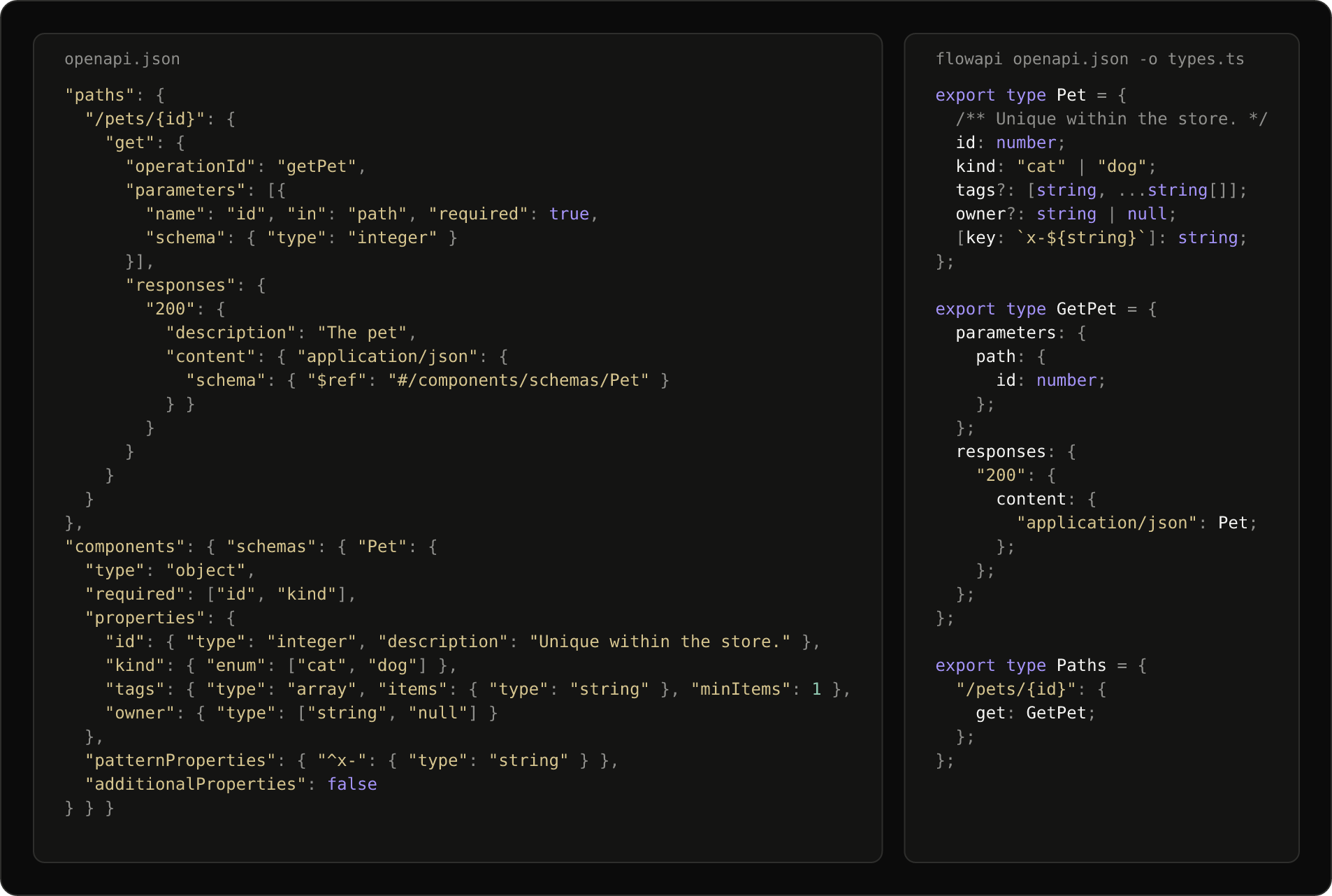
An OpenAPI description beside the TypeScript flowapi prints for it: Pet with its described id, the kind as a union of literals, tags as a non-empty tuple, owner as a string or null, x- extensions as a template literal index signature; GetPet’s path parameter and 200 response; and Paths

Conformance

Every value the schema accepts, the type accepts

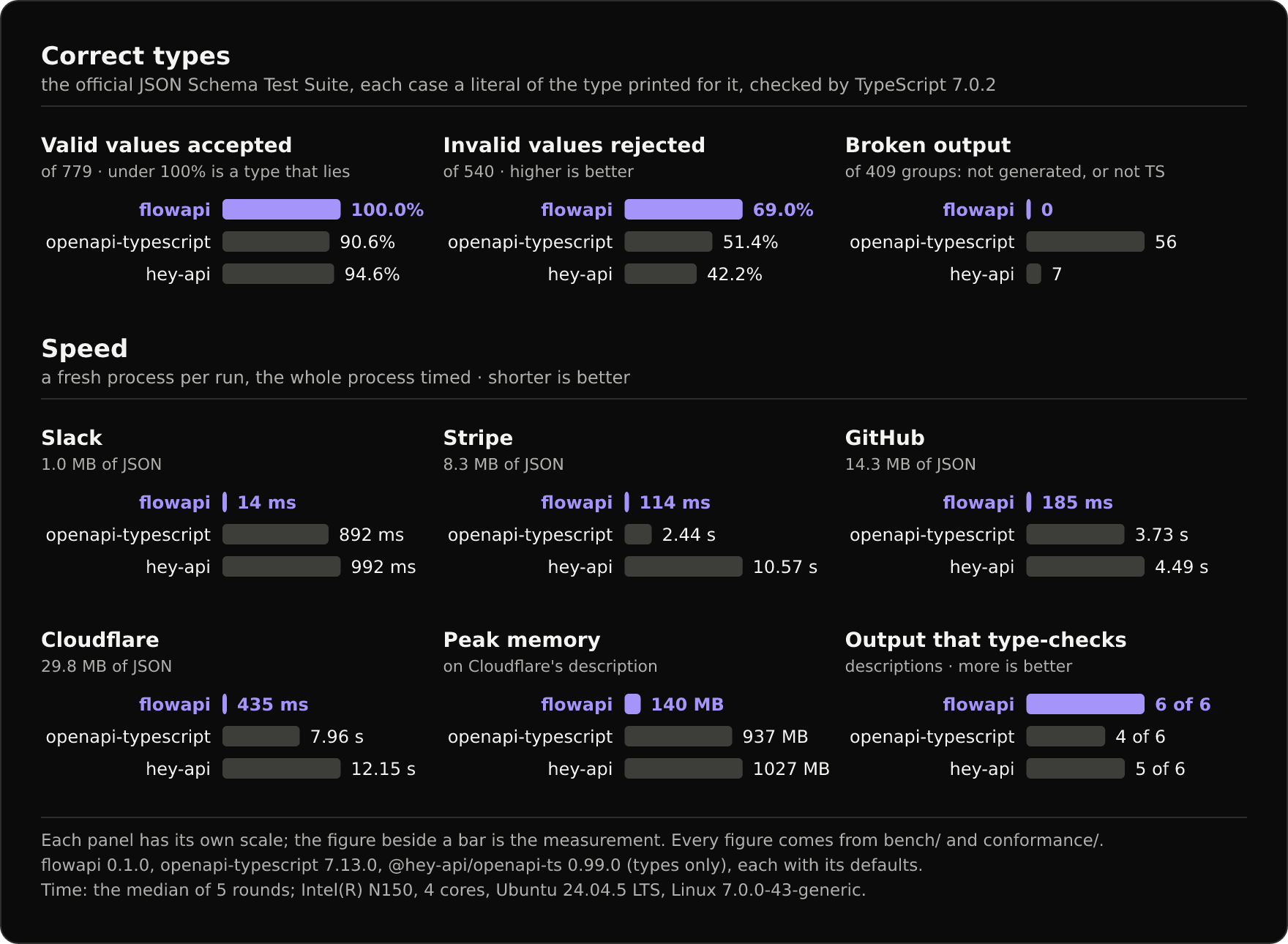
Each schema of the official JSON Schema Test Suite becomes a type, and each test value is handed to the TypeScript compiler as a literal of it. All 779 valid values type-check. 373 of the 540 invalid ones are refused.

JSON Schema Test Suitevalid ininvalid outbrokenflowapi 0.1.0100.0%69.0%0openapi-typescript 7.1390.6%51.4%56@hey-api/openapi-ts 0.9994.6%42.2%7 Each schema as an OpenAPI 3.1 component, each tool with its defaults.Broken: groups that failed to generate or printed invalid TypeScript.

Speed

Cloudflare’s 30 MB description in under half a second

Each tool ran as a fresh process on real descriptions, five rounds, the median kept. On Cloudflare’s, flowapi peaks at 140 MB of memory where the other two take 937 MB and 1027 MB, and its output type-checks for all six descriptions.

descriptionflowapiopenapi-typescripthey-apiSlack, 999 KB14 ms892 ms992 msStripe, 8.3 MB114 ms2.44 s10.57 sGitHub, 14.3 MB185 ms3.73 s4.49 sCloudflare, 29.8 MB435 ms7.96 s12.15 s The median of five rounds on an Intel N150.

Beside the others

The whole comparison in one picture

Correct types, broken output, time and memory, each panel on its own scale, from the same runs as the two cards before. The tools compared and their versions are pinned in the repository, so anyone can run it again.

flowapi beside openapi-typescript and hey-api: valid values accepted on the official JSON Schema Test Suite (100% against 90.6% and 94.6%), invalid values rejected (69.0% against 51.4% and 42.2%), broken output (0 against 56 and 7 groups), and the time to generate Slack’s, Stripe’s, GitHub’s and Cloudflare’s descriptions, peak memory on Cloudflare’s and how many outputs type-check

SDK

Requests written, nothing sent

--sdk adds two functions per operation: one writes the request by its style and explode, one reads the answer by status and Content-Type. Any HTTP client sends it, or none in a test. The output imports nothing.

getPetRequest({ path: { id: 7 }, query: { tags: ["a b", "c"] } }){ method: "GET", path: "/pets/7",  query: "tags=a%20b&tags=c", headers: {} } getPetResponse(res.status, headers, await res.text()){ response: "200", status: 200,  mediaType: "application/json", body: Pet }

Two targets

TypeScript or Rust, from Rust or npm

The Rust target prints serde types and an SDK of its own, sound on the same suite. The npm package is the generator compiled to WebAssembly, with no runtime dependency, and prints the Rust command’s output byte for byte.

oracleresultsuite, TypeScript: valid in779 of 779suite, Rust (serde): valid in787 of 787random schemas: valid in4,319 of 4,319OAI examples: type-check78 of 78SDK style examples: differ0 of 51

Documentation

4 pages →

Generate your types

Free · MIT license

  1. Run it

    npx @localix-ai/flowapi openapi.json -o types.ts for JSON, or the Rust command, which reads YAML too: cargo install --locked --git https://github.com/localixai/flowapi --tag v0.1.0 flowapi-cli.

  2. Import the types

    Each component schema is a type of its own name, each operation one with its parameters and responses, and Paths maps every path to them.

  3. Add the SDK if you want it

    --sdk prints the request and response functions after the types. --target rust prints serde types instead.